Sunday, November 17, 2013

History of Computer Science: Von Neumann Architecture

Computers that were developed in the earlier era had fixed programs. These computers or devices are not completely obsolete. People use these machines because of their simplicity and for training students. You can take an example of a simple calculator; all it does is some basic mathematical operations. Can it do text processing? Absolutely not! How would you feel, if you had to reprogram your device every time your requirements changed or use different devices for different purposes? Tedious right! It led to the invention of stored-program computer.

Von Neumann Model, developed in 1945 is the base of a stored-program computer in which data and instructions are in the same electronic memory. This fact distinguishes it from the Harvard model which stores data and instructions in different memory. On a large scale this treatment of instructions as data is what makes compilers, assemblers and other automated programming model possible.  ENIAC discussed in earlier blog is a stored-program computer. Though Von Neumann Model was developed as early as in World War II, yet it is one of the most popular architecture even today. It has three main components: memory that stores instructions and data, a control unit and arithmetic and logic unit that moves the data and program in and out of memory along with executing these instructions, the last one being a bus through which data flows between the other components.

Von Neumann Model has its drawbacks and few mentioned are:
  • It performs inefficiently under modern pipelining architecture.
  • One program may break other’s programs, including the operating system and even crash the system.

Program modification by design or by accident can cause a serious bottleneck for this architecture. However, most of these problems can be alleviated by using branch prediction logic, using hybrid architecture by using a cache to separate data and instructions.  This architecture is one of the major milestones in computer science history and its simplicity has maintained its popularity all along.
References:                                                                                        

History of Computer Science: Electronic Numerical Integrator and Computer

The first milestone in the History of Computer Science was the invention of the abacus about 2000 years ago. Moving the beads accomplished several simple mathematical operations. Blaise Pascal is usually credited with building the first digital calculator in 1642. It performed addition operations to help his father who was a tax collector. The world’s first commercially successful calculator that could add, subtract, divide and multiply was built by Charles Xavier Thomas, a century later. Around the same time, Charles Babbage proposed the first general mechanical computer called the Analytical engine. It contained Arithmetic Logical Unit (ALU), basic flow control and an integrated memory. Thus began the evolution of computer science. Computers those days looked very different from those that we have today. Let’s take a look at one of them.

In 1945, University Pennsylvania came up with the first electronic computer called Electronic Numerical Integrator and Computer (ENIAC). Can you imagine a computer more than 1000 square-feet? Yes, ENIAC was that big with several fans to prevent overheating of the device. Programmers made use of punch cards or tape to feed program instructions. Though ENIAC could compute 5000 operations in seconds, yet it failed frequently because it consumed 150KW of power, leading to a rumour that lights dimmed in Philadelphia whenever it was switched on. It performed 385 multiplications per second, or forty division operations per second or three square root operations per second.

ENIAC
Were engineers crazy to construct such huge computers? In fact, they were extremely smart; it was their thoughts and ideas that shaped computer science as we know today. Gradual progressions in hardware and software then were accelerated not just due to the demand but due to inane human curiosity. Being a computer scientist myself, and a part of this evolution I can’t wait to contribute and advance this science even further!

References:

Sunday, November 10, 2013

File Sharing: Cloud based file sharing

We regularly backup our photos, music and data. Once backed up, it is incredibly easy and convenient to access these files remotely from our laptops, tablets, and smart phones. The well-known products that offer such services include Google Drive, Microsoft Sky Drive, Dropbox, Box, SugarSync and many others. Almost all of them offer the file storage service free of cost up to a certain storage limit. When individuals rely so much on these services it is natural for corporate IT departments to bring in such services into the workplace. Well it does have its pros and cons. 

Let us look at the pros first. Sharing files with multiple people is now a click of a button; it especially reduces the hassles with sharing image heavy presentations and videos. It reduces the costs required to set up a Virtual Private Network (VPN) and manage the file storage servers in an internal Data centre. It also helps with business continuity; a coffee spill on a laptop or any other natural catastrophes does not cause any loss of data. Since it’s a shared file, updating is really easy and everyone is guaranteed to get the latest version of the file. More importantly, companies need not educate their employees on how to use these services as they use the same in their personal lives.

However, there is increased complexity to manage the files outside of the internal data centre. Security is a greatest concern; a malicious hacker can gain access to the entire database at once. A disgruntled employee can copy the entire data into his personal cloud, or corrupt the central database. If companies are relying on a third party cloud then is their data really secure? The third party has complete access the all the data. Downtime of the cloud due to a virus, surrounding weather or power outages are serious concerns.

Fortunately, it is possible to work around the negatives with well drafted and enforced policies. Firstly, rely on cloud providers with security certifications. Have access restrictions in place, so that not everyone has access to each and every file. Create a culture in the company that ensures a sense of responsibility among every employee about confidential corporate data.

Finally, cloud file sharing is a boon, whose advantages weigh far more and the disadvantages can be overcome with proper workarounds. The onus is on every one of us.

References:

Monday, November 4, 2013

Data Structures: AVL trees

We know that data structure in computer science refers to the way in which we organize and store data such that it can be used in an efficient manner. You must have heard of stacks, queues, linked lists, trees to organize data. All these are examples of data structures that have advantages and handles the basic operations insert, delete and search at varying degrees of complexity. Tree is an abstract data structure. Many kinds of tree data structures exist. To name a few, we have binary search trees(BST), red black trees, B trees, B+ trees, AVL trees and so on.

What are AVL trees?
Also known as self-balancing binary search trees, these were the first data structure of this kind to be invented. BST is the simplest tree data structure; however, some data sets can make the tree unbalanced which increases the complexity of basic operations. A balanced tree is one in which difference between the height of left sub-tree and right sub-tree is not greater than one.

AVL trees follow the same rules that apply to the binary search tree, hence it is simple too. However, AVL trees require some additional operations that keep them balanced and these operations are called tree rotations. The acceptable height difference between the left and the right sub-tree at any point in the AVL tree should be -1, 0 or 1. Hence, after every Insertion and deletion operation on these trees we need to handle these rotation operations to keep the tree balanced. Refer to this if you want to learn how insertion, deletion and searching work. The image shows how insertion can be performed.

Why people prefer these trees?
The time complexity of the AVL tree for insertion, deletion and search is O(logn) which makes this one of the most efficient trees for retrieving stored data.

References:

Sunday, October 27, 2013

Hacking: Who are hackers?

When we hear the word ‘hacker’, what is the first thing that comes to our mind? They are bad people! We think that hackers are the ones who attack computers and steal information and so on. To some extent it is true, there are such people. But they make a very small portion of all the hackers. There are hackers with good intentions called ethical hackers. They find out issues with the software and let the software owner know the problem before an unethical hacker exploits it.

Hackers are the ones who look at computers very differently than the rest of others. It is their thinking ability and vision that leads to real invention. In fact, companies like Google, Microsoft and Facebook gives bounties in tens of thousands of dollars for ethical hackers who find critical vulnerabilities.

Many security and network protocols maintain open standards, so that researchers and other ethical hackers can find out any problems with the protocol. The prime example here can be public key encryption protocol. This protocol is security critical and is used to to protect our banking, business and e-commerce data. The underlying algorithm is public, but is still hard to crack as it requires immense computational power. Till date, people have not found any backdoor to this security protocol and millions are being spent to make sure none such exist, or if they exist the good guys find them first.

Well, there are malicious hackers too. For example, the computer virus CryptoLocker, recently in news which encrypts all the data in the computer and will give you the decryption key only if you pay some money.

In reality, most hackers want to learn the complexity of the computer world and solve real complex problems. Hope such hackers gain numbers.

Sources:
http://www.forbes.com/sites/jameslyne/2013/10/22/computer-virus-spreading-that-means-you-never-get-to-see-your-files-again/

Sunday, October 13, 2013

Open Source: Vim

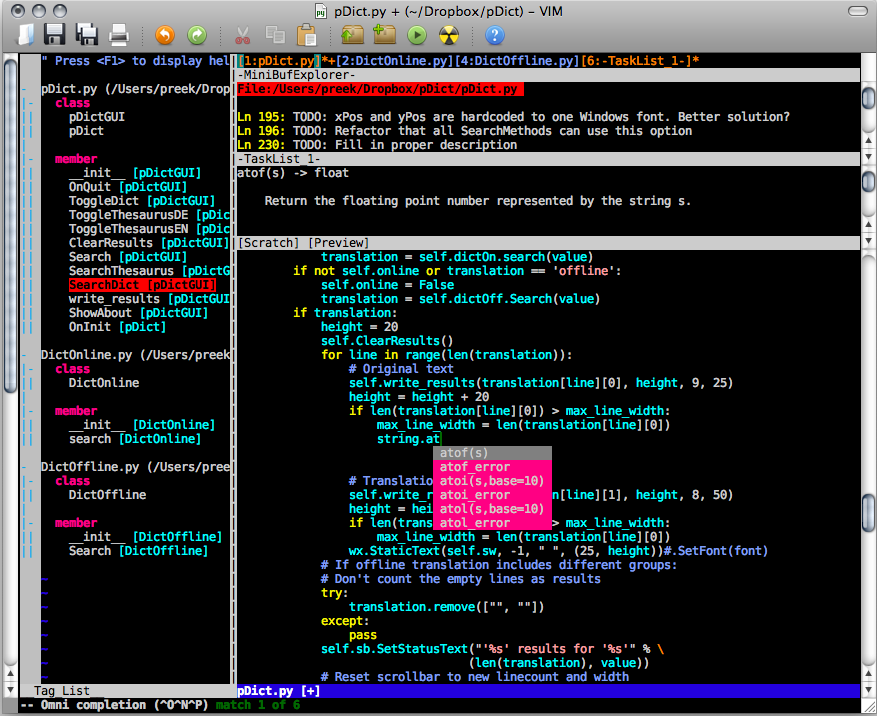
We are extremely familiar with the popular Windows editor, Notepad. Similarly, Vi is a popular choice as an editor in Linux/Unix world. Vi is a basic text editor with powerful and non-fancy features. "Vim" is an acronym for "Vi IMproved". Vim has yet more features than Vi, including mouse support, graphical versions, visual mode, many new editing commands. Vim has become one of the most commonly used text editors by programmers; I am one of them too! It was written by Bram Moolenaar and was made publicly available in 1991. Vim is free and open source software.

There is a built-in tutorial for beginners in Vim, which can be accessed by vimtutor command. A user manual too is available and it has the help feature that will walk us through the commands.  Vim basically has two modes edit mode and command mode. Vim has a vast array of commands and features.
Anyone can customize Vim, right from user interface and macros to user defined functions. Any functionality can be added or extended using vimscript, Vim‘s internal scripting language. It also supports other scripting languages like Perl, Python, Ruby, Lua, Tcl and Racket.

Vim has definitely improved a lot over Vi. Vim is compatible with Vi, however it is not 100%. Few enhancements of Vim include auto-completion, comparison between files and revision control of files, Yes! I have tried these file operations. It has a rich plugin support. Various compression formats like gzip, bzip2, zip and tar format are supported. It also supports remote editing over network protocols like HTTP and SSH, session state preservation, split (horizontal and vertical) and tabbed window support. It provides multi-language support (Unicode), visual mode and many more.

Lastly, few of the platforms that Vim is supported on include UNIX, Linux, BSD, Mac OS, IBM OS-2, Microsoft Windows versions, etc. One thing you should really appreciate about Vim is that, apart from providing rich and powerful features it also encourages users to consider donating to children in Uganda, as it is released under the charityware clause.

Source:

Sunday, October 6, 2013

Agile: Various Methodologies for Software Development

There are various agile methodologies for software development. Most of them share the same philosophy, characteristics and practices. But, each one is different from an implementation point of view. Here are few claims of the main methodology which I find interesting.

Scrum - Here, Product Owner works closely with the team to figure out and slice the system functionality that forms the “Product Backlog”. Features, bug fixes, non-functional requirements and so on dwell in the Product Backlog. Each slice is a customer deliverable. Slices are prioritized as “potentially shippable increments” of software. Cross-functional teams estimate and sign-up to deliver a slice, which can be divided into tasks, in each sprint. The sprint length can be defined by the team. So, next sprint will have the next set of prioritized tasks and hence, it will continue.

Feature Driven Development - FDD is again a model-driven, short-iteration process. The features are small and useful. It follows eight practices for the feature delivery. Unlike other agile methodologies, FDD has short specific phases of work for each feature which include Domain Walkthrough, Design, Design review, Code, Code review and Promote to Build.

These were few processes of the main methodology, but, there are many more like Lean and Kanban, Extreme Programming, Crystal, and Dynamic Systems Development Method and so on. Usually, any team does not follow strict rules of agile development; there is always some amount of flexibility induced. This will help the team to perform effectively and have the deliverable ready even before the customer can know it.

Sources: